
PowerApps Project Time Tracker
Enterprise-Grade Time Management Solution Built with Microsoft Power Apps
Transform your workforce time management from manual spreadsheets to an intelligent, cloud-based system. The Project Time Tracker app streamlines employee time tracking, automates reporting, and provides real-time project visibility.
The Time Tracking Challenge
Employee time tracking is critical to project management, billing, and payroll processes. Yet many organisations still rely on manual, disconnected processes that are inefficient, error-prone, and difficult to scale.
The Old Way: Manual Spreadsheets
- Employees manually enter time into Excel files
- No centralised data repository
- Data scattered across multiple documents
- Manual copying and consolidation required
- Duplicate entries and data inconsistencies
- Time-consuming report generation
- Limited visibility into project status
- No audit trail or change history
The Modern Way: Cloud-Based Tracking
- Centralised digital time entry system
- Unified database for all time records
- Real-time project visibility
- Automated data consolidation
- Built-in validation and consistency
- One-click report generation
- Holistic view of all projects
- Complete audit trail and history
The Solution: The PowerApps Project Time Tracker eliminates spreadsheet chaos by providing a modern, integrated platform for time tracking, project management, and reporting.
Understanding PowerApps for Business Solutions
Microsoft PowerApps is a low-code platform that enables organisations to build custom business applications without extensive developer involvement. It integrates seamlessly with Microsoft 365, Dynamics 365, and other enterprise systems.
Why PowerApps for Time Tracking?
PowerApps provides the perfect foundation for building a Project Time Tracker because it offers:
Multi-Platform Access
Users can access the app from web browsers, mobile devices, and directly within Microsoft Teams—wherever they work.
Rapid Development
Build complex business logic quickly without extensive code. Deploy updates instantly across all users.
Deep Integration
Connect seamlessly to SharePoint, Dataverse, SQL, Excel, and hundreds of other data sources.
Role-Based Access
Implement granular security controls so users see only the projects and data relevant to them.
Workflow Automation
Integrate Power Automate to automate approvals, notifications, and downstream processes.
Scalability
Grows with your organisation from dozens to thousands of users without performance degradation.
Core Features of the Project Time Tracker
1. Log Project Time
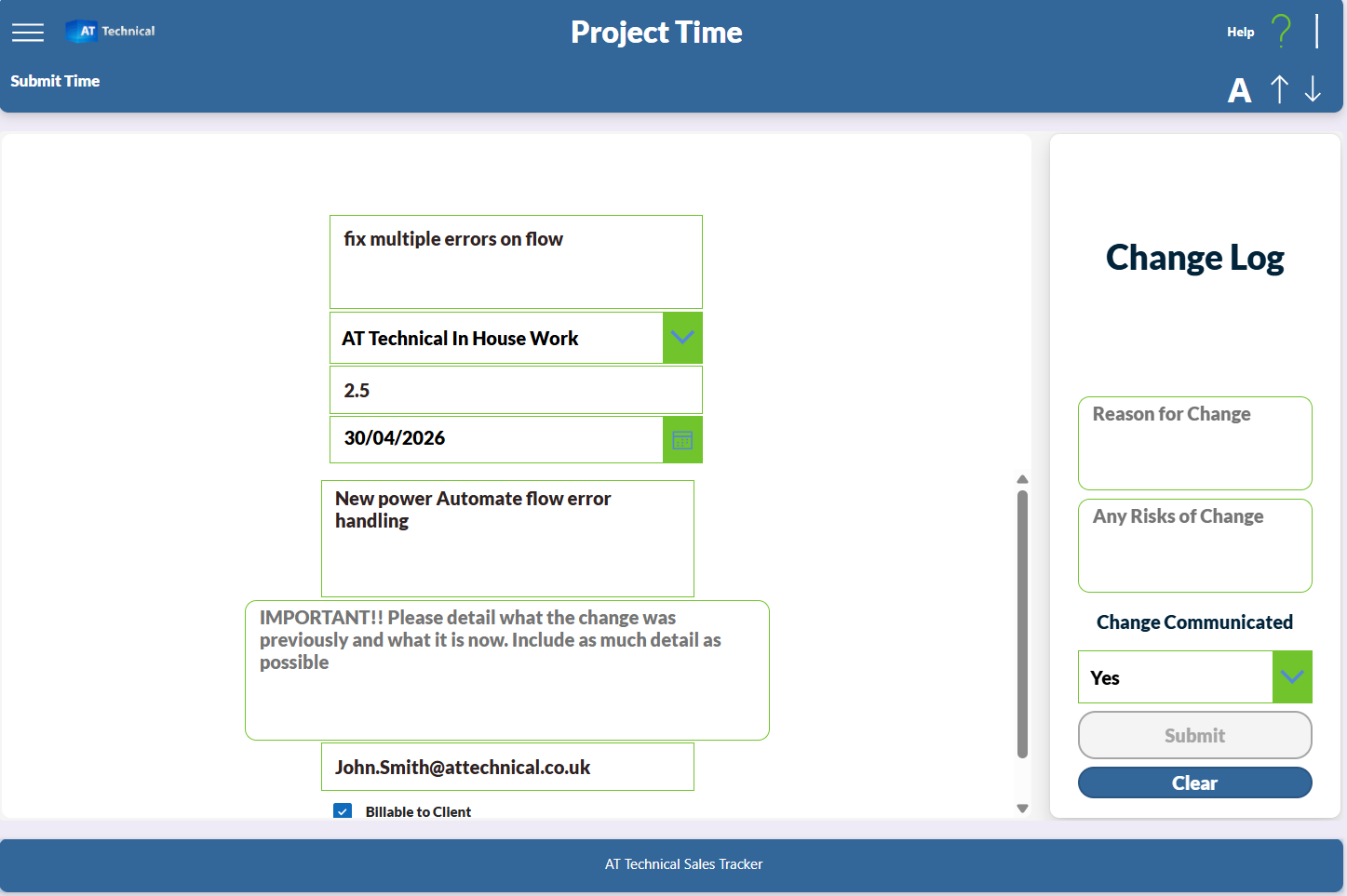
The 'Log Project Time' page provides users with an intuitive form to record their work activities. Users specify:
- Project they worked on
- Time spent on the project
- Specific task completed
- Detailed description of work performed
2. Employee Project Time View
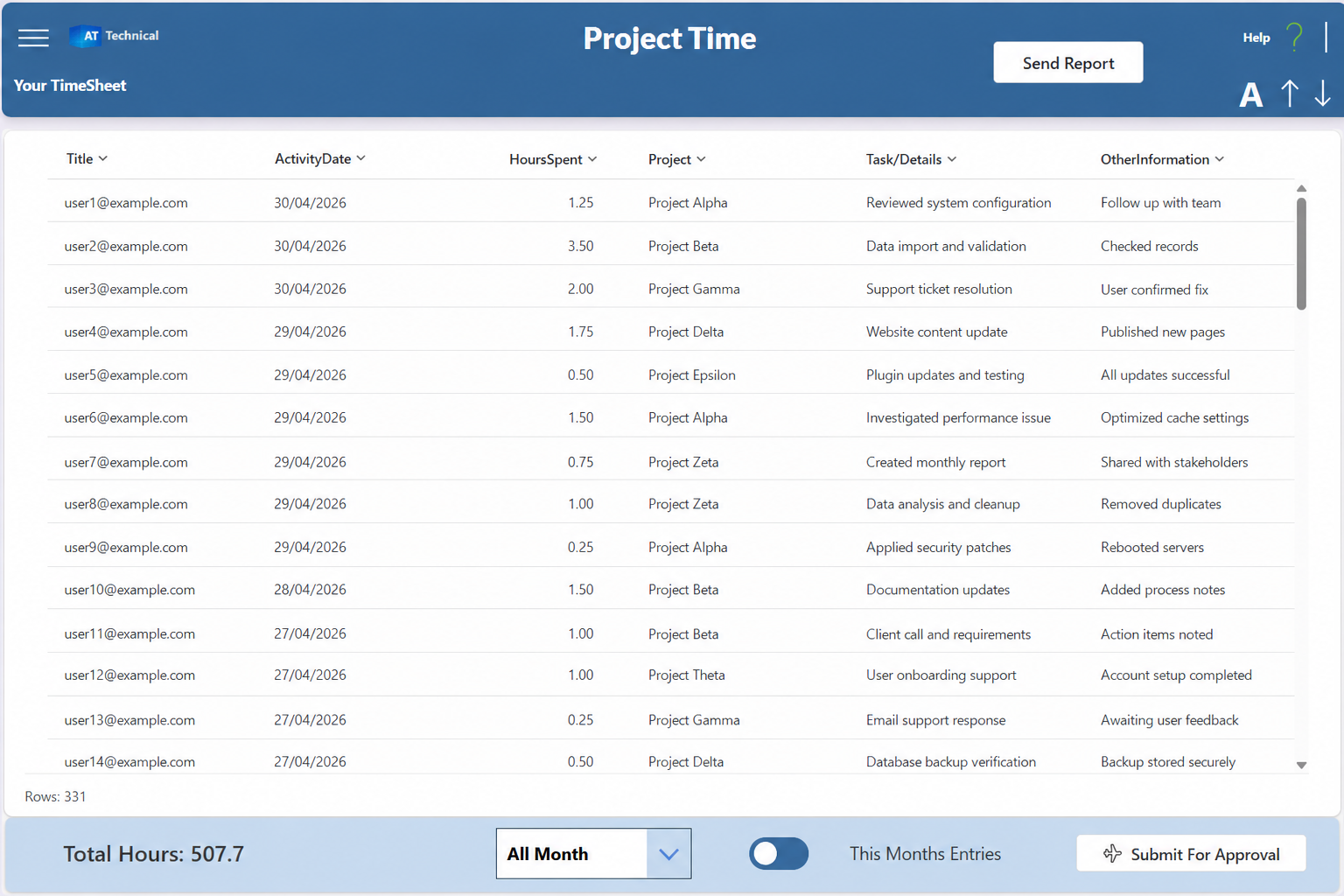
The Personal Timesheet screen provides employees with a comprehensive view of their work throughout the month. Key features include:
- Complete record of all hours worked
- Automatic total hours calculation
- Payroll estimate based on hourly rate
- Monthly timesheet summary
- Historical data for all months
3. Project & Client Time View
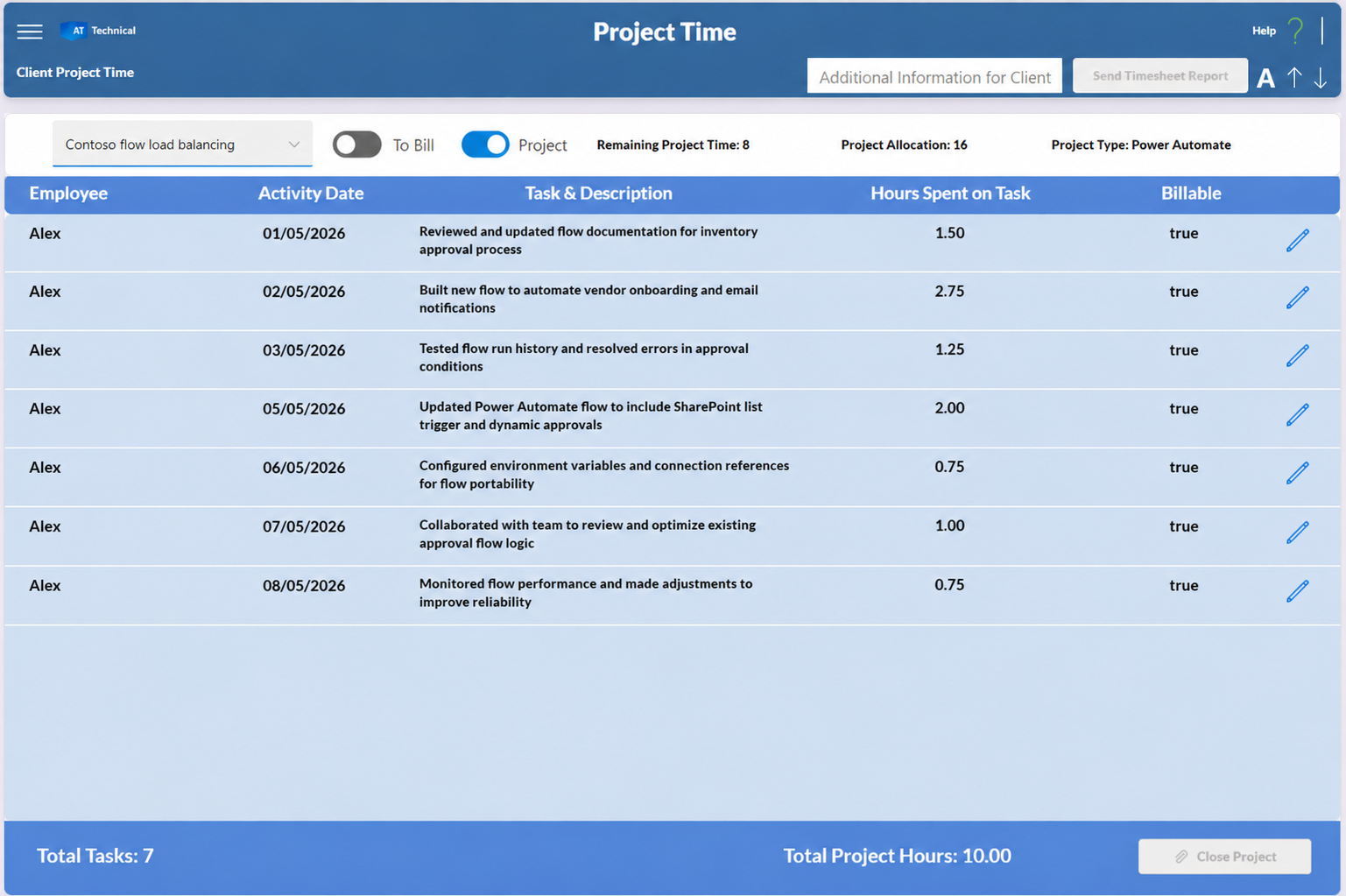
Managers and administrators get a birds-eye view of all projects with real-time metrics:
- All projects and their status at a glance
- Time allocated vs time used vs time remaining
- Resource utilisation across projects
- Client-specific project grouping
- Budget tracking and forecasting
4. Advanced Functionality
Generate and Share Reports
The "Send Report" button enables users to generate professional PDF timesheets and email them directly to stakeholders. Features include:
- One-click PDF generation from timesheet data
- Customisable recipient list
- Automatic formatting and branding
- Email delivery directly from the app
Approval Workflow Integration
When employees submit their timesheet for approval, a Power Automate workflow is triggered automatically:
- Email notification sent to manager/supervisor
- Manager reviews timesheet for accuracy
- Approval or rejection with comments
- Upon approval, new blank timesheet created for next period
- Rejected timesheets returned for correction
Integrated Change Management
The app includes built-in change management integration. When work is completed against a workstream, users can log the entry directly to change management, which:
- Automatically prompts for additional change details
- Links time entries to change records
- Maintains audit trail of all changes
- Updates change management system in real-time
- Ensures compliance and documentation
Key Benefits of the Project Time Tracker
Accessible Anywhere
Access via web browser, mobile app, or Microsoft Teams—employees can log time from anywhere, anytime.
Automated Reporting
No more manual report generation. PDF timesheets are created and distributed automatically.
Client Visibility
Easy-to-export worksheets make sharing project status with clients simple and professional.
Complete Project View
See all open projects with allocated time, time used, and time remaining in one dashboard.
Project Assignment
All employee time is assigned to specific projects and workstreams—no time is unaccounted for.
Role-Based Security
Employees see only their own timesheet and assigned projects. Managers see their team's data.
Change Management
Integrated change logging ensures compliance and maintains complete audit trails.
Scalable Solution
Grows with your organisation. Whether you have 10 or 1,000 employees, the system scales seamlessly.
Complete Application Overview
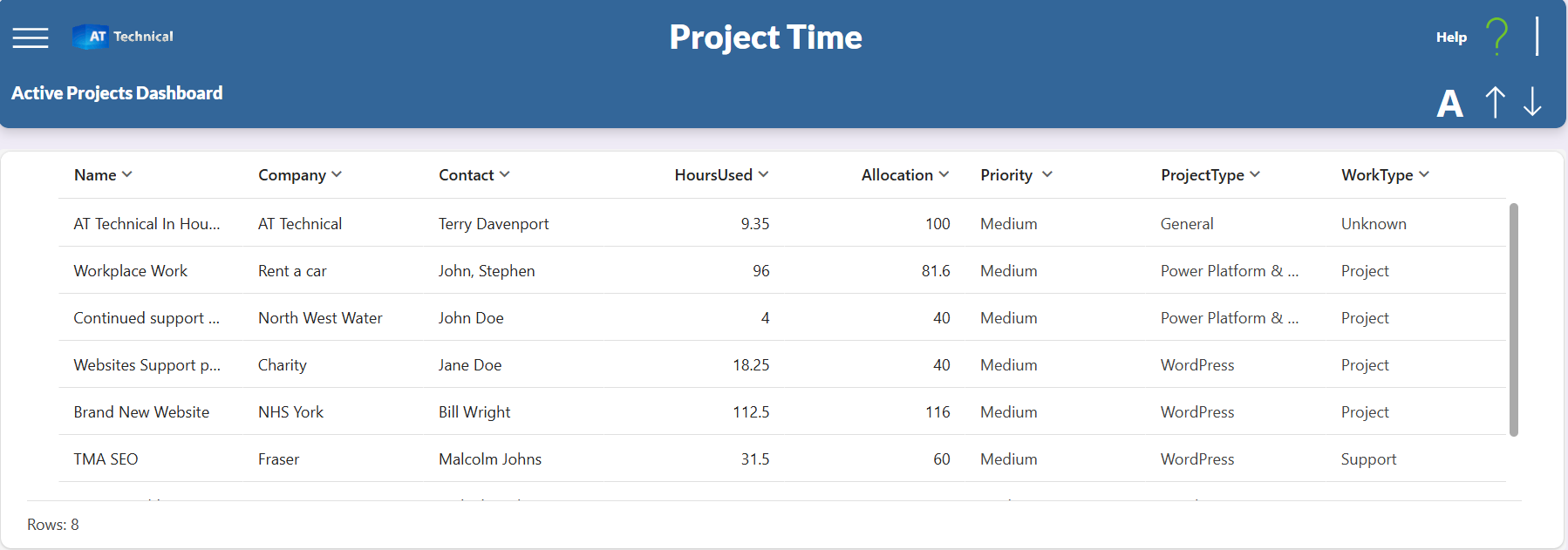
Here's the complete PowerApps Project Time Tracker interface showing all major components working together:
Technical Foundation
The Project Time Tracker leverages several Microsoft 365 and Power Platform technologies to deliver enterprise-grade reliability:
Frontend Layer
- PowerApps Canvas App - User interface
- Responsive Design - Works on all devices
- Real-time Calculations - Hours, totals, estimates
- Teams Integration - Access from Teams app
Backend Layer
- Dataverse - Secure data storage
- Power Automate - Workflow automation
- SharePoint - Document management
- Role-Based Security - Access control
Data Security: All data is stored in Microsoft Dataverse with encryption at rest and in transit. Role-based access controls ensure users see only their authorised data. Audit logs track all changes for compliance.
Our Implementation Roadmap
We follow a structured approach to ensure successful deployment of the Project Time Tracker in your organisation:
Initial Consultation
We meet with your team to understand your specific requirements, current processes, and success metrics. We identify your unique needs and discuss how the app can be customised.
Roadmap Planning
We create a detailed implementation plan including timelines, resource requirements, and success criteria. We design the data structure and workflow requirements specific to your organisation.
Development & Customisation
We build and configure the app to match your exact requirements. This includes custom fields, validation rules, workflow integration, and reporting specifications.
Testing & Refinement
Comprehensive testing with your team ensures the app works perfectly for your use cases. We refine features based on feedback and optimise performance.
User Training & Deployment
We provide comprehensive training for your team and handle the go-live process. We monitor closely during the initial rollout period.
Ongoing Support & Optimisation
We continue to monitor the system, provide technical support, and implement improvements based on user feedback and changing business needs.
Ready to Transform Your Time Tracking?
The Project Time Tracker represents a significant step forward in how organisations manage employee time, projects, and resources. By moving from manual spreadsheets to an intelligent digital system, you'll gain visibility, reduce administrative overhead, and make better business decisions.
Next Steps:
- Schedule a 30-minute discovery call to discuss your requirements
- See a live demonstration of the Project Time Tracker
- Get a customised proposal with timeline and investment
- Begin your digital transformation journey
Real Client Solutions

Archbishop Holgate Hospital
Case Study
Office 365 tenant deployment, configuration and new online WordPress website