
A Power Pages site operates as a public website. This is true even when most content sits behind a sign-in. Therefore, implementing proper Power Pages security headers is absolutely essential. These headers tell the browser exactly what the site can load. Furthermore, they dictate who can frame it and which features are available. Specifically, they are the cheapest protections you can add. However, they are also easy to get wrong. Consequently, one badly written Content Security Policy (CSP) can break sign-ins, embedded reports, or forms. In this post, we share the exact approach we used. Specifically, we locked down a live portal that embeds Power BI reports and Microsoft Forms.
What this means for your organisation
- Headers reduce real risks. Specifically, they help block cross-site scripting, clickjacking, and data leaks. Moreover, they achieve this at almost no running cost.
- A security scan score isn't the goal. Indeed, some warnings come from the platform itself. Therefore, a good partner documents and accepts them. Consequently, they avoid "fixing" them in a way that breaks the site.
- Headers must travel with releases. For instance, setting them manually causes Live and Test environments to drift apart. Thus, Power Pages security headers belong securely in your solution.
Essential Power Pages Security Headers That Matter
In Power Pages, you set response headers strictly as site settings. Specifically, these are naturally named HTTP/<header-name>. You can easily add them in the Portal Management app. Alternatively, you can configure them under Security > Advanced settings inside the design studio. Therefore, these are the core Power Pages security headers we set on every portal:
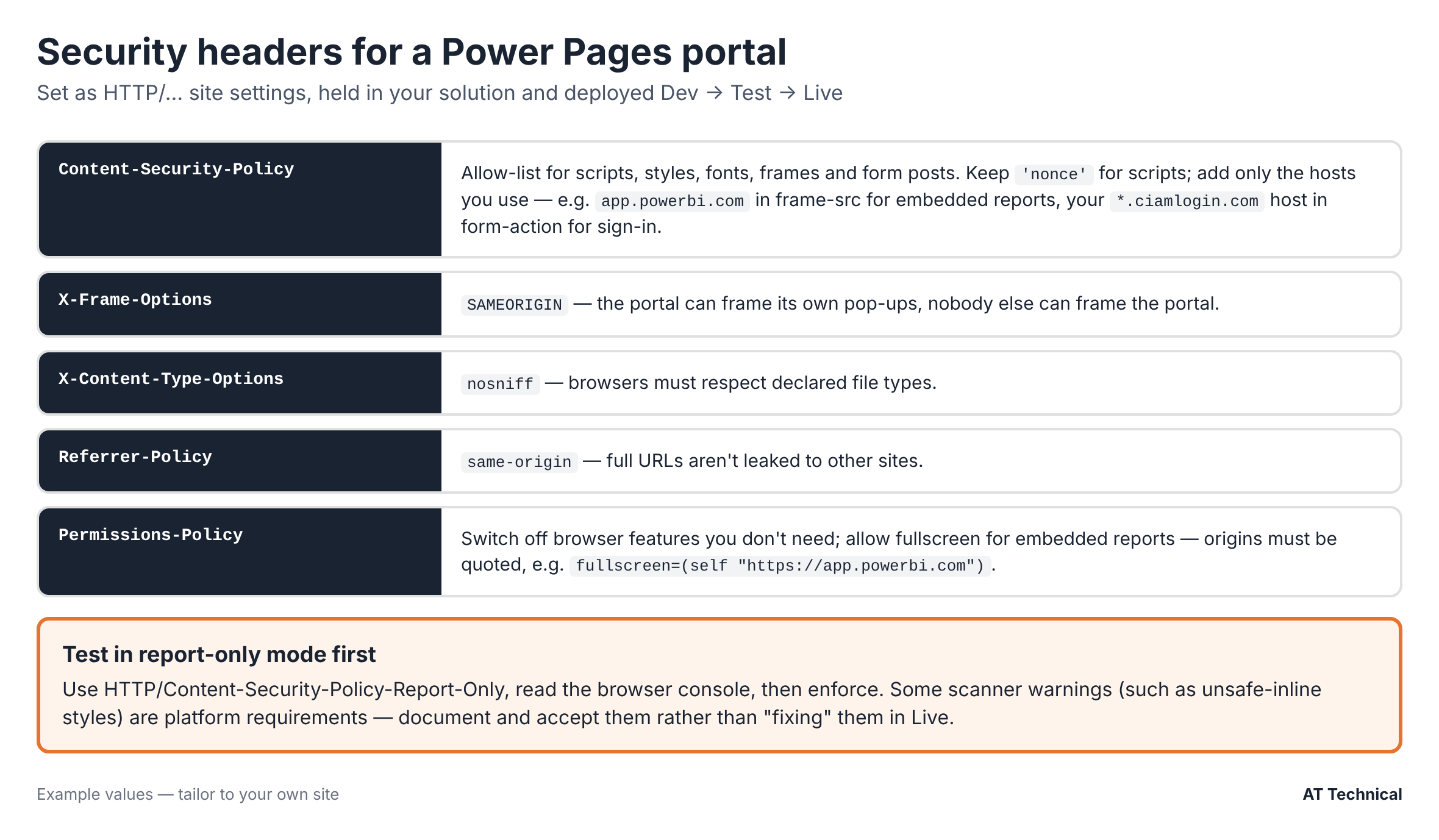
The core header set, complete with example values to carefully tailor for your own site.
Microsoft's site checker routinely recommends SAMEORIGIN or DENY for X-Frame-Options. Additionally, it heavily recommends nosniff for X-Content-Type-Options. However, you should absolutely use SAMEORIGIN rather than DENY. Specifically, you must do this if your site opens pages in native pop-ups. Otherwise, those internal pop-ups will break completely.
Building a Content Security Policy with Power Pages Security Headers
Sites created since November 2025 automatically receive a default CSP from Microsoft. Specifically, this allows standard scripts from the site and Power Pages content domains. Furthermore, it smoothly includes a 'nonce' strictly for inline scripts. However, older sites might lack a CSP entirely. Regardless, you will need to extend it eventually. For example, this happens once you embed reports, external forms, or custom sign-ins.
Test Your Power Pages Security Headers in Report-Only Mode
We highly recommend Microsoft's official advice on testing. Specifically, create the HTTP/Content-Security-Policy-Report-Only setting first. Consequently, the browser safely logs what it would normally block. Importantly, it accomplishes this without actually breaking functionality. Next, click through every single page and user role carefully. Then, read the browser console errors methodically. Afterward, add only the explicit hosts you actually need. Finally, directly move your newly tested policy into your live Power Pages security headers.
An Example Starting Point
Below is a highly effective policy shape that works well. Specifically, it perfectly suits a portal with embedded Power BI, Microsoft Forms, and Entra External ID. However, you must firmly treat this as a testing starting point. Therefore, please do not use it as a simple copy-and-paste answer:
style-src 'self' 'unsafe-inline' https:;
font-src 'self' content.powerapps.com https://*.cdn.office.net data:;
img-src 'self' content.powerapps.com https://*.cdn.office.net data:;
frame-src 'self' https://app.powerbi.com https://forms.office.com https://forms.cloud.microsoft;
child-src 'self' https://app.powerbi.com https://forms.office.com https://forms.cloud.microsoft;
form-action 'self' https://<your-tenant>.ciamlogin.com;
frame-ancestors 'self';
object-src 'none';
Why Each Policy Addition Is There
- frame-src app.powerbi.com: Embedded reports systematically load inside a secure iframe. Specifically, they load directly from the Power BI service.
- frame-src / child-src forms hosts: Microsoft Forms now naturally serves from two distinct domains. Therefore, you must securely allow both.
- form-action ciamlogin.com: The standard sign-in process systematically posts directly to your External ID tenant.
- 'unsafe-eval': Use this exclusively where a platform component demands it. For instance, the design studio labels this as "inject unsafe eval". Consequently, you should review it regularly.
Mistakes to Avoid With Power Pages Security Headers
Unquoted Origins in Permissions-Policy
Permissions-Policy uses a markedly different syntax from CSP. Specifically, origins must always be heavily encapsulated in double quotes. For example, securely use fullscreen=(self "https://app.powerbi.com"). Otherwise, the browser completely ignores the entry. Consequently, the embedded report's fullscreen button quietly stops working.
Blaming the CSP for a Sign-In Fault
A CSP form-action error during sign-in looked exactly like a header problem. However, the real underlying cause was a missing app registration. Specifically, it was completely missing from the External ID user flow. Therefore, always read the error carefully. Furthermore, exhaustively check your identity setup before inappropriately loosening your Power Pages security headers. Read more on that in part 2.
Handling Security Scan Warnings for Power Pages
Run a standard public security scanner immediately against your site. Consequently, you will likely see some technical warnings. Unfortunately, you cannot simply remove these without inadvertently breaking the platform. For instance, these commonly include 'unsafe-inline' styles or Microsoft domain scripts. Therefore, here is our highly recommended approach:
- First, systematically list every single warning generated.
- Next, quickly fix the minor issues entirely within your control. Specifically, this heavily includes missing headers or exceptionally broad wildcards.
- Then, permanently record exactly why each remaining warning is accepted. Furthermore, actively note who agreed to it and the specific review date.
- Finally, absolutely never apply automated "fix" buttons in Test or Live. Instead, safely make the calculated change in development first.
Wildcards Are a Necessary Trade-Off
Microsoft's security guidance heavily suggests using highly specific domains rather than wildcards. However, some Microsoft services inherently serve fonts and images from constantly rotating sub-domains (such as *.cdn.office.net). Consequently, a carefully narrowed wildcard becomes the single most practical option. Therefore, firmly keep your wildcards as incredibly narrow as possible. Furthermore, explicitly document each specific one you deploy.
Deploying Your Power Pages Security Headers Safely
- First, properly add the
HTTP/…site settings directly into your solution. Specifically, always do this precisely in the development environment. Consequently, they securely deploy alongside everything else seamlessly. - Next, ruthlessly delete any manually hand-made copies from Test or Live. Therefore, you rigorously maintain only one reliable source of truth.
- Then, smoothly deploy systematically across your Dev, Test, and Live environments. Afterward, meticulously check the active response headers utilizing browser developer tools.
- Furthermore, immediately sign in utilizing every single available user role. Specifically, intentionally open every page containing an integrated report or form. Consequently, carefully watch the console for any sudden policy violations.
- Finally, actively re-check your Power Pages security headers consistently after substantial platform updates. Indeed, Microsoft occasionally changes their underlying component hosts without warning.
Key Takeaways on Power Pages Security Headers
- First, definitively set your core Power Pages security headers on absolutely every portal.
- Next, safely test the CSP thoroughly in report-only mode initially. Then, accurately add only the specific external hosts you truly need.
- Furthermore, always correctly quote origins comprehensively in your active Permissions-Policy. Indeed, it emphatically does not use standard CSP syntax.
- Moreover, clearly document any deliberately accepted scanner warnings thoroughly. Consequently, entirely avoid forcing a flawed perfect score at the site's ultimate expense.
- Finally, safely keep all modified headers comprehensively inside your designated solution. Therefore, strictly check them extremely carefully after every single live deployment.
Last checked firmly against Microsoft Learn guidance: November 2026.
The Power Pages Technical Series
- Designing table permissions that actually work
- Setting up Entra External ID for Test and Live
- Security headers with Power BI and Microsoft Forms (you are here)
- Power BI Embedded with row-level security
- Five Power Automate lessons from production
Also in this carefully curated collection: What a Power Pages portal really costs to run and our highly detailed audit action tracker case study.
Related Resources & Reading
📘 Microsoft: Manage your site's Content Security Policy 📘 Microsoft: Security best practices for Power Pages 📘 Microsoft: Site checker security issues 🔧 Power Pages services securely provided from AT TechnicalWant a Technical Second Opinion on Your Portal's Security?
We comprehensively review Power Pages sites heavily against Microsoft's strict security guidance. Furthermore, we securely fix what can be correctly fixed. Consequently, we precisely document what should be completely accepted. Therefore, we purposefully avoid awkwardly breaking user sign-ins or complex embedded content.
AT Technical effectively helps organisations:
- First, systematically review headers, CSP, and overarching site checker results.
- Next, successfully build and heavily test a meticulously tailored Content Security Policy.
- Furthermore, seamlessly move all required site settings directly into your structured release process.
- Finally, perfectly document accepted technical risks clearly for your stringent internal auditors.
We are heavily certified Microsoft Power Platform technical solution architects. Furthermore, we are definitively a proudly Cyber Essentials certified technical business. Specifically, we are securely based in Manchester. Moreover, we successfully work heavily with notable organisations across the entire UK.
Request a Detailed Portal Security Review Today