
Your portal users often sit outside your organisation. For example, they might be customers, suppliers, partners, or member organisations. Consequently, they need a secure way to sign in. Furthermore, you should not add them to your internal Microsoft 365 tenant. Entra External ID for Power Pages is Microsoft's current answer. Moreover, it works brilliantly with modern portals. However, it also hides a few traps. Specifically, these issues appear when you move from a single test site to separate Test and Live environments. Therefore, here is how we set it up, and what we would do differently.
What this means for your organisation
- External users stay out of your main tenant. Specifically, they sign up and sign in through a separate external tenant. Therefore, they never become guests in your Microsoft 365 directory.
- It is usually free at portal scale. In fact, Microsoft's core External ID offer is free for the first 50,000 monthly active users. However, premium add-ons like SMS verification are charged separately.
- One tenant can serve Test and Live. Consequently, this saves admin effort. On the other hand, some testing changes will affect real users too. Therefore, your partner should explain which settings are shared.
Why Choose Entra External ID for Power Pages Over Guest Accounts?
| Approach | Advantages | Disadvantages |
|---|---|---|
| Entra External ID (external tenant) | Built for customer and partner sign-in. Furthermore, it includes self-service sign-up, custom branding, MFA options, and 50,000 free monthly active users. Most importantly, it keeps outsiders out of your workforce tenant. | It creates another tenant to manage. Moreover, some settings are tenant-wide. Consequently, they affect every environment using it. |
| Guests in your Microsoft 365 tenant (B2B) | Familiar to IT teams. Additionally, it works well when external users also need Teams or SharePoint access. | Outsiders sit in your internal directory. Therefore, it creates more governance overhead. Furthermore, it isn't designed for large numbers of portal-only users. |
| Local portal accounts | Simple to start initially. | Microsoft recommends moving to a modern identity provider. Otherwise, you take on password management and weaker security controls. |
For a portal used by several outside organisations, users only need portal access. Therefore, Entra External ID for Power Pages was the clear choice.
How the Pieces Fit Together
Microsoft's setup guide walks through the configuration step by step. First, you create an external tenant. Next, you register an application for your site using the site's reply URL. Then, you create a sign-up and sign-in user flow. After that, you add the application to that user flow. Finally, you enter the client ID, authority, and metadata address into the Power Pages identity provider settings.
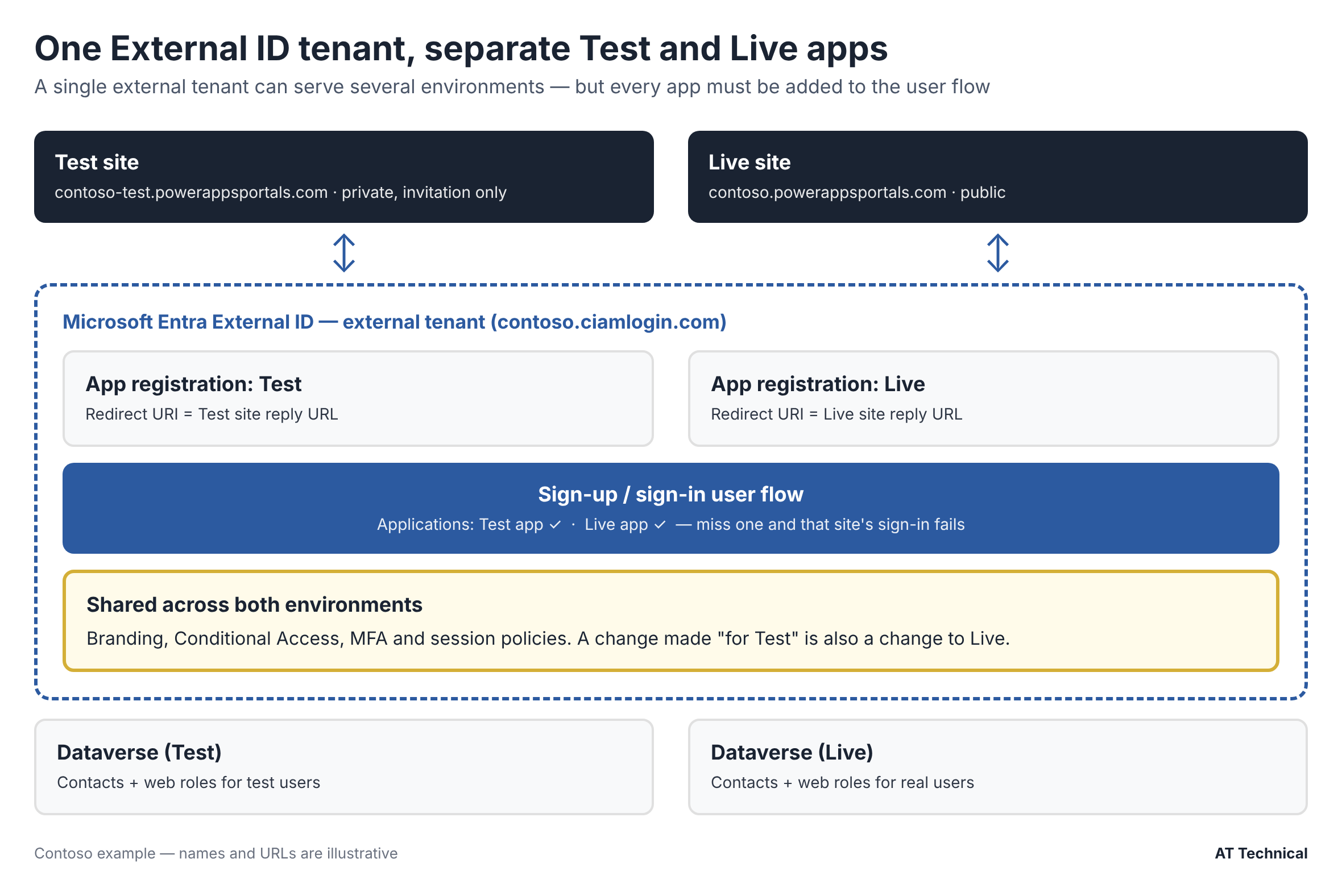
One external tenant, one app registration per environment, both added to the user flow (Contoso example).
We used one external tenant for both Test and Live environments. However, we created a separate app registration per environment. Specifically, each app has its own redirect URI and its own client secret. Consequently, a Test change cannot break Live sign-in. Furthermore, secrets can be rotated independently.
The Gotcha: The App Wasn't in the User Flow
Initially, Test sign-in worked perfectly. However, on go-live day, Live sign-in failed completely. Specifically, the browser console showed a Content Security Policy (CSP) error on the form submission. Consequently, this sent us looking at our security headers first.
The Real Cause
The new Live app registration had never been added to the user flow. Specifically, the Test app was in the flow, whereas the Live app was not. Therefore, the CSP message was a symptom, not the cause. Once we added the Live app to the flow, sign-in worked immediately. Moreover, no header changes were needed.
Consequently, we now include "add the app to the user flow" as a named step in our deployment runbook. Furthermore, we run a live sign-in test as the very next step for every new environment.
Settings Shared Across Test and Live Environments
Because Test and Live use the same external tenant, several settings apply to both environments at once:
- Company branding on the sign-in pages (such as logo, favicon, background, and text).
- Conditional Access and MFA security policies.
- User flow settings, including the sign-in method and attributes collected at sign-up.
Therefore, you must treat any change to these items as a Live change. Specifically, apply the same approval and timing controls. Conversely, if you need fully isolated testing of these settings, you will need a second external tenant.
Keep Test Private
Set your Test site to private (invitation only). Consequently, testers can still sign in easily. Meanwhile, the wider public cannot stumble onto a test environment that shares your Live sign-in branding.
Power Pages Settings Worth Deciding Up Front
When configuring Entra External ID for Power Pages, you should decide on four core settings early:
Invitations or Open Registration
For a business portal, invitations give you strict control over who gets in. Additionally, they control which Contact and web role each user maps to. Conversely, open registration suits public services.
Contact Mapping With Email
When enabled, a user who signs in matches to an existing Contact with the same email address. While this is convenient, you must ensure email addresses on Contacts are accurate and unique.
External Logout
Decide whether signing out of the portal should also sign the user out of External ID. Either option can be right. However, the key is to decide deliberately and document it.
Secret Expiry
App registration secrets expire eventually. Therefore, record the expiry dates in a secrets register. Furthermore, put renewal into a quarterly health check so sign-in never fails unexpectedly.
One Odd Error: "Chunked Cookie Is Incomplete"
During testing, one user hit an error mentioning an incomplete chunked cookie. Fortunately, this was caused by a stale authentication cookie in their browser rather than a site fault. Consequently, clearing the site's cookies fixed it immediately. However, if it recurs across many users, you should reduce the number of claims in the token. As a result, this shrinks the cookie size. In short, it is well worth knowing before it lands on your support desk.
Key Takeaways
- Use Entra External ID for Power Pages for portal-only external users. Moreover, the core offer is free up to 50,000 monthly active users.
- Create one app registration per environment. Additionally, always add every app to the user flow.
- Branding, Conditional Access, and MFA are tenant-wide. Therefore, always treat changes to them as Live changes.
- Track secret expiry dates carefully. Finally, test sign-in after every single deployment.
Last checked against Microsoft Learn guidance: November 2026.
The Power Pages Technical Series
- Designing table permissions that actually work
- Setting up Entra External ID for Test and Live (you are here)
- Security headers with Power BI and Microsoft Forms
- Power BI Embedded with row-level security
- Five Power Automate lessons from production
Also in this collection: What a Power Pages portal really costs to run and our audit action tracker case study.
Related Resources & Reading
📘 Microsoft: Set up Entra External ID with Power Pages 📘 Microsoft: External ID pricing and billing 📘 Microsoft: Invite contacts to your site 🔧 Power Pages services from AT TechnicalNeed Secure Sign-In for External Users?
We set up Entra External ID for Power Pages portals. Specifically, we handle branding, environment separation, invitation journeys, and the runbook your team needs to keep it working.
AT Technical helps organisations:
- Configure External ID tenants, apps, and user flows
- Separate Test and Live environments safely
- Design smooth invitation and registration journeys
- Document secrets, expiry dates, and quarterly health checks
We are certified Microsoft Power Platform solution architects and a Cyber Essentials certified business. Furthermore, we are based in Manchester and work with organisations across the UK.
Talk to Us About Portal Sign-In