Most conversations about a new portal focus exclusively on the initial build cost. However, the number that truly matters over three to five years is the ongoing Power Pages running costs. Specifically, you must budget for the licences, capacity, and support needed every month after go-live. Furthermore, Power Pages pricing differs significantly from standard Microsoft licensing. Consequently, a few items are easy to miss until your first invoice or capacity warning arrives. Using real figures from an October 2026 project, this guide explains UK Power Pages running costs. Moreover, it shows where the money goes and how to keep expenses under control.
The short answer
- A small secure portal with up to 100 signed-in users a month, embedded Power BI reporting, and two internal administrators costs roughly £760–£820 a month. Specifically, this covers Microsoft licences and capacity at November 2026 UK list prices (excluding VAT).
- Without embedded reporting, the exact same portal can easily run for under £250 a month.
- Embedded Power BI is usually the biggest single expense. Meanwhile, unexpected anonymous traffic is the most common billing surprise.
How Licensing Impacts Power Pages Running Costs
Power Pages is not licensed per named user like Microsoft 365. Instead, you buy capacity packs per website, per month. Consequently, Microsoft counts the unique users who visit each site in a calendar month.
| Pack | UK list price (excl. VAT) | What it covers |
|---|---|---|
| Authenticated users | £153.80 per site per month, paid yearly | 100 unique signed-in users on one site in a calendar month. Furthermore, it adds 2 GB Dataverse database and 16 GB file capacity. |
| Anonymous users | £57.70 per site per month, paid yearly | 500 unique visitors who do not sign in, on one site in a calendar month. Additionally, it adds 0.5 GB database and 4 GB file capacity. |
Three Rules That Catch People Out
- It's per site. Therefore, a person who uses two of your portals in the same month counts on both.
- It's per month. Consequently, any unused capacity does not roll over to the next month.
- Internal users may already be covered. Specifically, staff with a Power Apps Premium licence do not consume Power Pages capacity.
Additional Factors in Power Pages Running Costs
The Power Pages user packs are only part of the overall financial picture. In addition, a typical secure portal also needs the following items:
Sign-In: Microsoft Entra External ID
Usually £0. The core offer is completely free for the first 50,000 monthly active users. However, premium add-ons, such as SMS verification, are charged separately.
Embedded Reporting: Power BI Embedded
Around £555 a month for the smallest A1 capacity running 24/7 (our actual Azure charge). Because it is billed per hour, it can easily be paused. Furthermore, add a Power BI Pro licence (£10.80 a month) for whoever publishes reports.
Internal Admins: Power Apps Premium
£15.40 per user per month. This is needed for staff using the back-office model-driven app, especially in Managed Environments. Note that Microsoft has announced a list price increase starting 1 January 2027.
Automation: a Service Account
Power Automate Premium at £11.50 a month for the dedicated account that runs flows with premium connectors like Dataverse. Moreover, you will need a Microsoft 365 licence for its mailbox.
Storage: Dataverse Capacity
Often included at first. Licences add database and file capacity, which is pooled across the tenant. However, if you outgrow it, extra database capacity costs £30.80 per GB per month. Therefore, storing evidence uploads in SharePoint helps reduce costs here.
Support and Change
Varies. You will need a support retainer covering monitoring, fixes, Microsoft updates, and small changes. Ultimately, you must budget for this because Microsoft updates the platform several times a year.
A Worked Example of Power Pages Running Costs
Here is the monthly running cost for a portal like the one in our case study. Specifically, this scenario supports external users from several organisations, embedded dashboards, and two internal administrators.
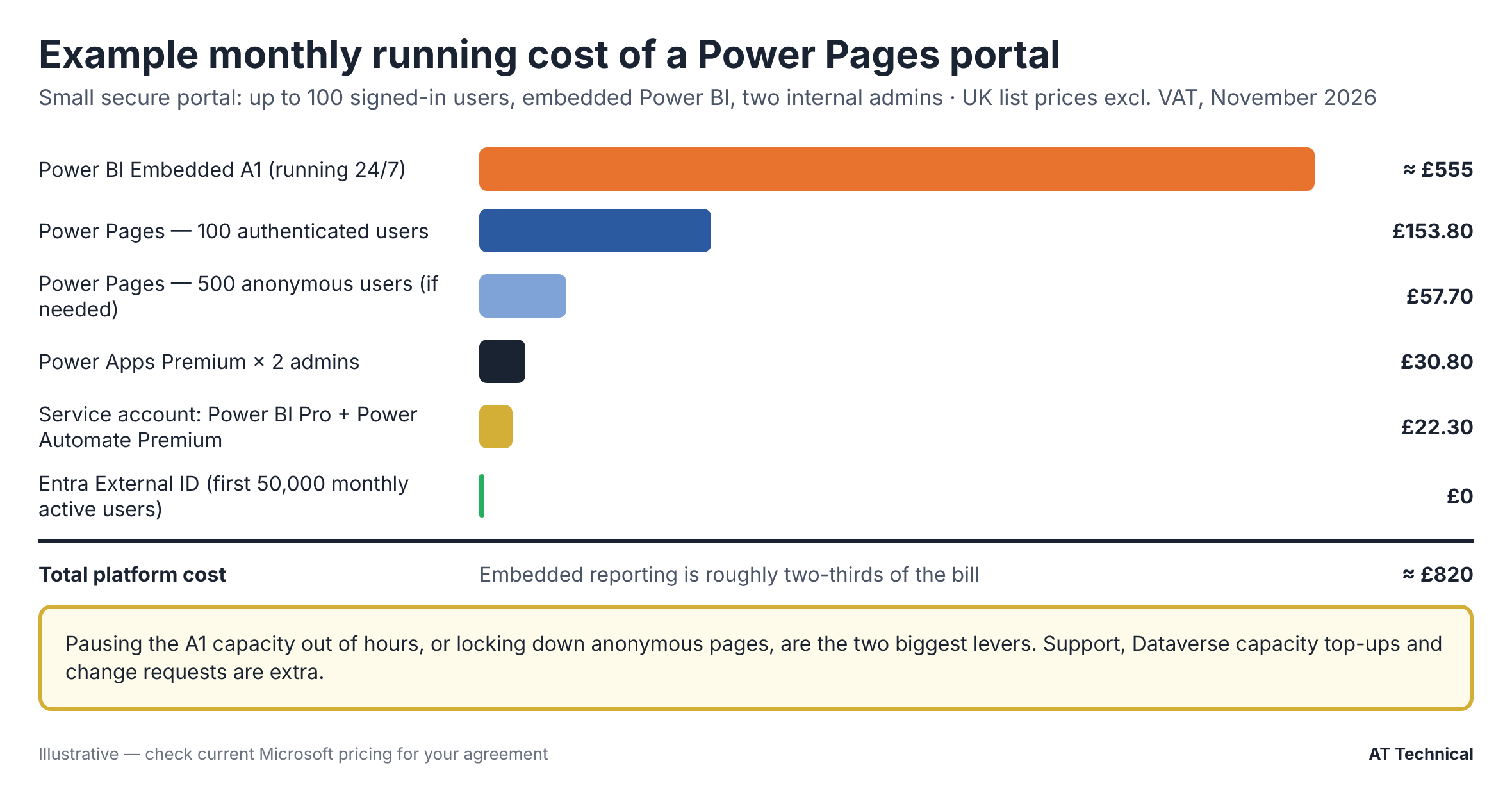
Example monthly platform cost at UK list prices, excluding VAT and support.
| Item | Monthly | Annual |
|---|---|---|
| Power BI Embedded A1, running 24/7 | ≈ £555.43 | ≈ £6,665 |
| Power Pages, 1 authenticated pack (100 users) | £153.80 | £1,845.60 |
| Power Pages, 1 anonymous pack (only if needed) | £57.70 | £692.40 |
| Power Apps Premium × 2 administrators | £30.80 | £369.60 |
| Service account: Power BI Pro + Power Automate Premium | £22.30 | £267.60 |
| Entra External ID (under 50,000 monthly active users) | £0 | £0 |
| Total | ≈ £820 | ≈ £9,840 |
Notice that embedded reporting accounts for roughly two-thirds of the total bill. Without it (and without the Power BI Pro licence), the cost drops significantly. Furthermore, with anonymous traffic locked down, the core platform cost is about £196 a month.
The Surprise: Anonymous Users
Within a week of go-live on our project, the capacity report showed a surprising figure. Specifically, it logged 445 anonymous users against zero anonymous capacity assigned. Although the portal was meant for signed-in users only, unauthenticated visitors still triggered capacity counts. For instance, anyone landing on the home page, sign-in page, or public FAQ before signing in counted as anonymous. Consequently, there were two clear ways to fix it:
Option A: Lock Down Pages
Use strict page permissions so that only the sign-in experience is public.
- Advantages: No extra licence cost; creates a smaller attack surface.
- Disadvantages: No public information pages; visitors see a sign-in prompt first.
Option B: Buy Anonymous Packs
Keep public pages open and properly license the incoming traffic.
- Advantages: Public help and landing pages stay freely available.
- Disadvantages: Costs £57.70 per 500 visitors per month. Moreover, bots and search engines can easily push numbers up.
Therefore, always check your capacity usage in the Power Platform admin centre during the first month after go-live, rather than waiting until renewal.
Five Ways to Control Power Pages Running Costs
- Decide if you truly need embedded reporting. If users only need a few figures, native portal lists and charts may be enough. Consequently, this saves around £6,600 a year. However, if you do need it, compare an A1 SKU with a Microsoft Fabric F capacity, which can also host embedded content.
- Pause capacity out of hours. An A SKU is billed strictly by the hour. Therefore, running it 12 hours a day on weekdays costs roughly a third of running it 24/7.
- Lock down anonymous pages unless your public pages genuinely earn their keep.
- Keep large files out of Dataverse. Instead, store evidence and documents in SharePoint through the standard Dataverse integration. Furthermore, agree on a retention period so old data is routinely removed. That also directly supports UK GDPR's storage limitation principle.
- Review licences quarterly. Specifically, check your capacity, licence assignments, storage, and secret expiry dates as a standing health check.
Power Pages Compared With a Custom-Built Portal
| Power Pages | Custom-built portal | |
|---|---|---|
| Advantages | Hosting, patching, sign-in, CDN, and a Web Application Firewall option are part of the platform. Furthermore, it is faster to build on Dataverse. It also integrates natively with Power BI, Power Automate, and Microsoft 365. | No per-user capacity charges. Additionally, you get complete design freedom and no dependency on Microsoft's licensing changes. |
| Disadvantages | Monthly costs grow with users and sites. Moreover, you must work within the platform's limits. Microsoft can also change prices, as seen with the 2027 Power Apps Premium increase. | You pay for hosting, security patching, penetration testing, and identity management yourself. Consequently, this leads to a higher build cost and requires more specialist support. |
Consider portals with hundreds rather than tens of thousands of users, especially where your data already lives in the Microsoft cloud. In these cases, Power Pages running costs are usually cheaper over five years once hosting, security, and maintenance are counted.
Questions to Ask Before You Commit
- First, how many unique users will sign in each month, and how many will visit without signing in?
- Second, will those people use more than one portal?
- Furthermore, do external users need embedded dashboards, and at what specific hours?
- Next, how many internal staff members will administer the underlying data?
- Additionally, how much data and how many files will you store, and for how long?
- Finally, who will support the portal after go-live, and what does that ongoing support cost?
Prices are Microsoft UK list prices excluding VAT, checked in November 2026, apart from the Power BI Embedded figure, which is an actual Azure charge. Your final price depends on your specific agreement. AT Technical is not a licensing reseller; therefore, please confirm final pricing with your Microsoft licensing provider.
Related Resources & Reading
📘 Microsoft UK: Power Pages pricing 📘 Microsoft UK: Power Apps pricing 📘 Microsoft: Entra External ID pricing 📗 Our Power Apps licensing guideWant a Running-Cost Estimate for Your Portal?
Tell us how many people will use your portal and what they need to do. Consequently, we will give you an honest estimate of build and Power Pages running costs, including the items that usually get missed.
AT Technical helps organisations:
- Estimate licences, capacity, and storage accurately
- Compare Power Pages objectively with custom alternatives
- Find immediate savings in an existing portal
- Plan ongoing support and quarterly health checks
We are certified Microsoft Power Platform solution architects and a Cyber Essentials certified business. Based in Manchester, we work closely with organisations across the UK.
Arrange a Free Consultation