

A Power Pages portal is only half the solution. Behind the scenes, Power Automate Dataverse flows send notifications, chase overdue items, and write audit trails. Furthermore, these automated workflows move complex approvals along. However, on a recent portal project, the flows caused more late-night debugging than the portal itself. Therefore, here are five lessons from taking Power Automate Dataverse flows into production behind a Power Pages site. Notably, one lesson involves a flow that sent around 300 emails before anyone noticed.
What this means for your organisation
- Automation is part of the security model. Specifically, some flows fill in fields that control who can see a record. Consequently, a failed flow is a security issue, rather than just a missing email.
- Standard patterns reduce support costs. For example, agreeing on one way to build common tasks makes failures predictable. As a result, your team can fix production issues much quicker.
- Plan the service account. Ideally, flows should run under a dedicated, licensed service account. Otherwise, automations may fail when a member of staff leaves.
Lesson 1: Some Fields Your Power Automate Dataverse Flows Write Are Security Fields
First, take the facilities management portal from part 1. In that portal, site managers reach job updates through a lookup from each update to its site. Subsequently, a flow fills that lookup in whenever an engineer adds an update. However, if the flow sets the lookup on the wrong record, site managers stop seeing new updates. Similarly, if the flow does not run at all, the records remain hidden. Moreover, there is no error message and no alert. Instead, users simply see missing data. In fact, we have seen this exact issue happen in production.
What We Do Now
- First, list every column that a table permission depends on, and mark the ones a flow populates.
- Second, make the source value required so there is always something to copy.
- Additionally, add a test that signs in as the affected role and checks that a new record appears.
- Finally, consider setting such fields in a synchronous plug-in instead. Consequently, Dataverse populates them instantly on every route, rather than seconds later via a flow.
For further context, we explain the permission side of this model in part 1 on table permissions.
Lesson 2: Use One Pattern to Write Dataverse Lookups in Power Automate
Setting a Dataverse lookup column from Power Automate is a common source of errors. Specifically, the dynamic-content picker was unreliable for lookups in our flows and produced 0x80060888 errors. Initially, we tried HTTP requests and the "Relate rows" action. Ultimately, however, we settled on one reliable pattern: an expression typed directly into the lookup field.
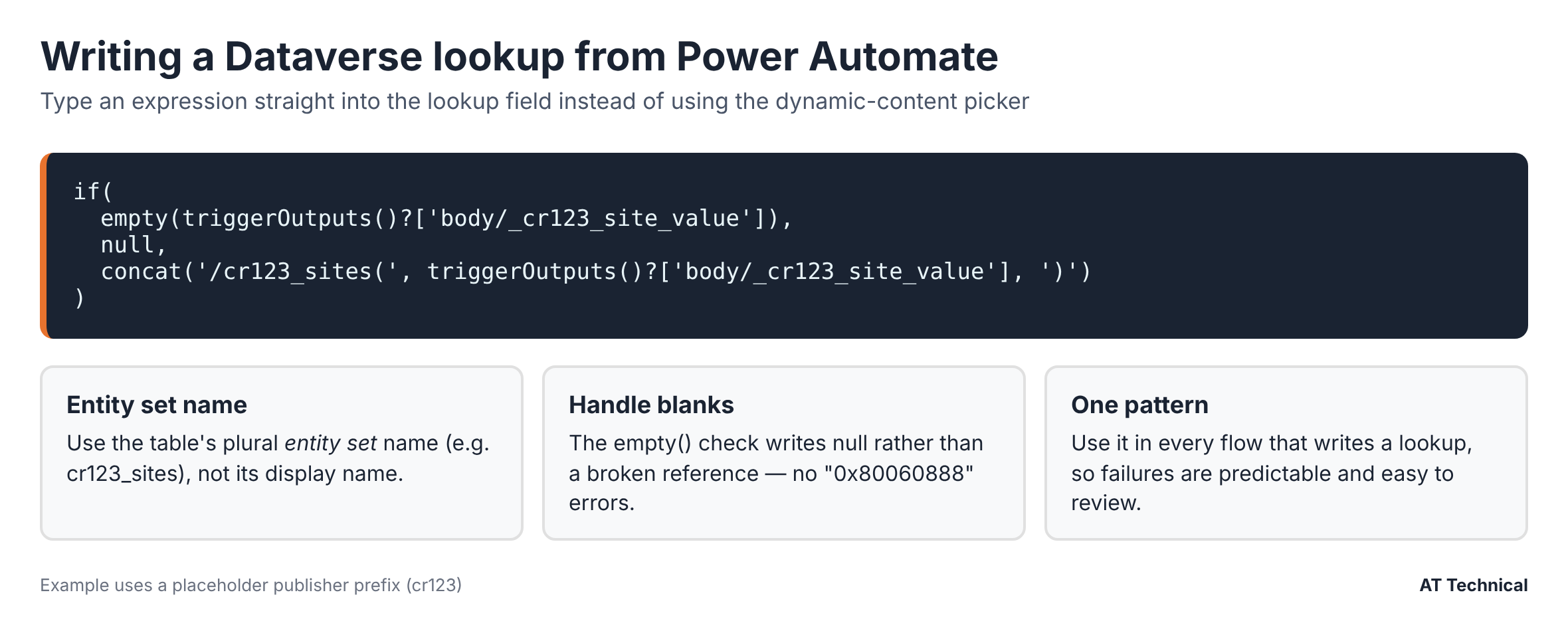
The lookup pattern we now use in every flow (placeholder publisher prefix).
Two things make this Power Automate Dataverse pattern reliable. First, it uses the table's entity set name, which is the plural name used by the Web API. Second, it writes null when there is no value, instead of creating a broken reference.
Lesson 3: A Flow That Updates Its Own Trigger Table Will Loop
During one update, a notification flow triggered whenever a record was modified. Later, we changed the flow to also write a value back to that same record. Because each write counted as a modification, the flow immediately triggered itself. Consequently, it sent another notification, wrote to the record again, and repeated the loop. As a result, around 300 emails went out before we switched it off.
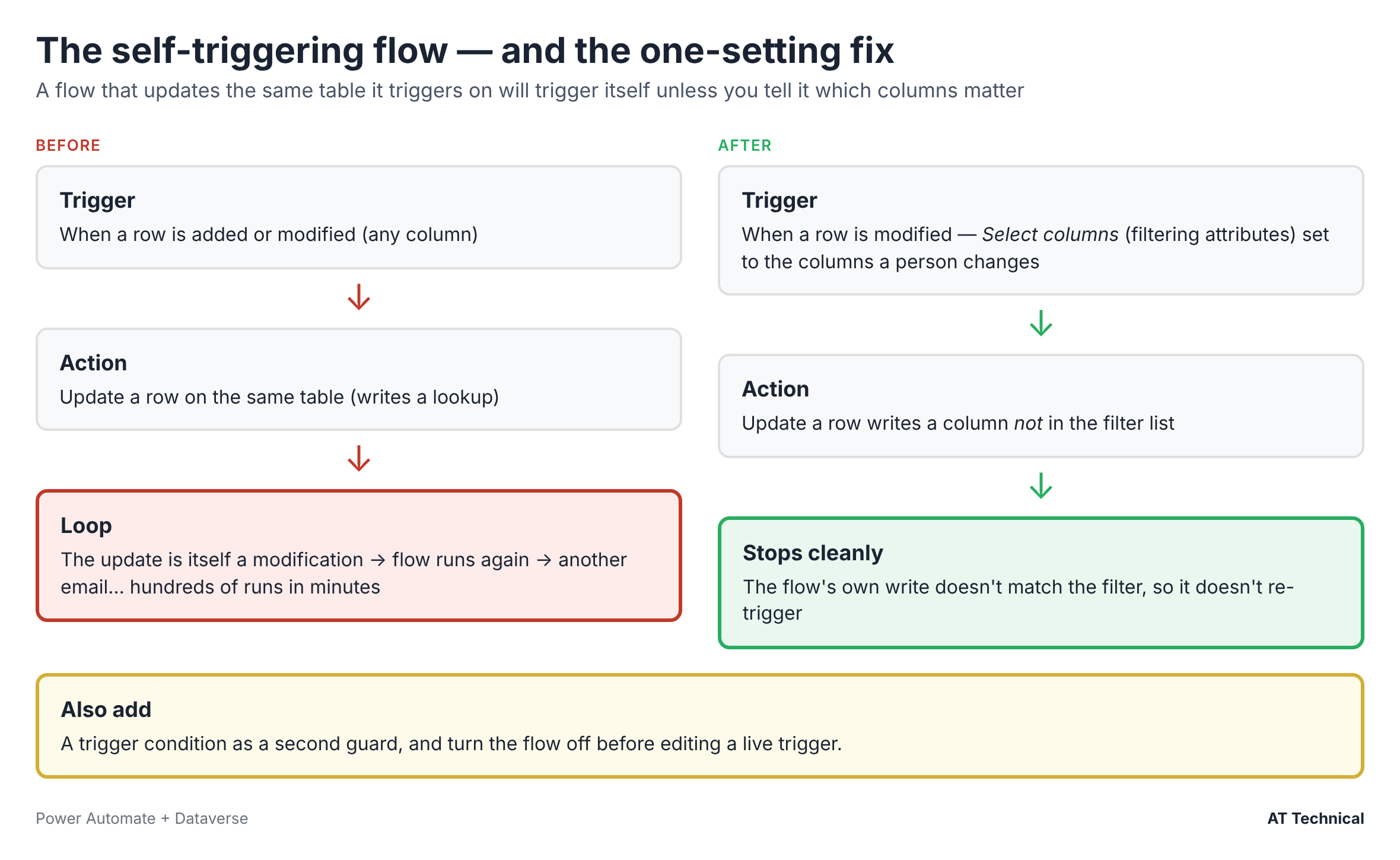
The loop, and the one-setting fix.
The Fix
On the Dataverse trigger "When a row is added, modified or deleted", configure Select columns (filtering attributes). Specifically, restrict it to only the columns that a person changes. Because the flow's own write uses a different column, it no longer re-triggers itself. In addition, add a trigger condition as a second guard. Above all, always turn a flow off before editing a live trigger.
Lesson 4: The Approvals Connector Isn't for External Portal Users
In the facilities portal, a contractor engineer might ask to sign off a job as complete. Similarly, they might request approval for extra work that was not in the original quote. In both scenarios, the client's site manager makes that decision. At first glance, Power Automate's built-in Approvals connector looks like the obvious tool. However, approvers must be users in your Microsoft Entra tenant, whereas site managers are external portal users. Therefore, we built the approval into the Power Pages portal instead:
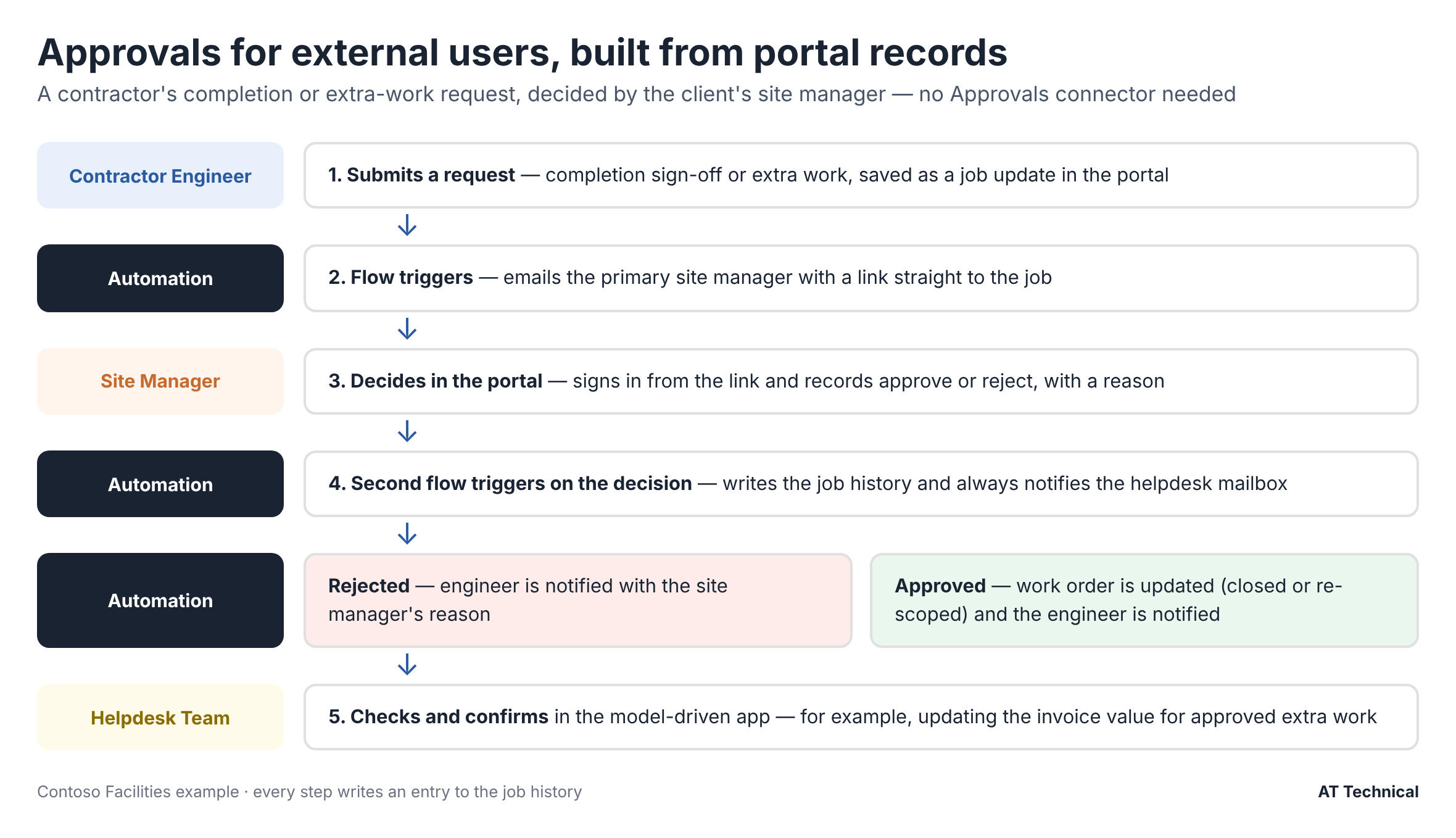
An approval chain built from portal records and flows instead of the Approvals connector (Contoso Facilities example).
- First, the engineer submits a request as a record in the portal.
- Next, a flow emails the site manager with a link back to the portal.
- Then, the site manager signs in and records their decision as another portal record.
- Finally, a second flow triggers on that decision, notifies the helpdesk team, and applies the outcome.
Every step writes to the job history. Consequently, the full record remains visible in both the portal and the helpdesk. Additionally, this creates a useful side effect: the approval sits in the same audit trail as everything else.
Decide Who Flows Talk To
Sometimes, a record has a primary and secondary person, such as Site Manager 1 and Site Manager 2. In that case, decide early which person your automations will email. For example, a simple rule gives secondary people portal access while excluding them as automation targets. Therefore, your portal notifications stay predictable.
Lesson 5: Build Power Automate Dataverse Flows for Three Environments From Day One
Environment Variables for URLs
Links in emails need the right portal and Dataverse URLs for Dev, Test, and Live. Therefore, hold them in environment variables, and never hard-code them in the flow.
A Dedicated Service Account
Connections run under a licensed service account, such as Power Automate Premium for premium connectors. Consequently, flows do not break when someone leaves or changes role.
Escape What Users Type
Whenever user-entered text goes into an HTML email, escape it first. As a result, this stops broken formatting and prevents anyone from injecting links or markup into notifications.
Use Created On for Dates
We retired a separate "submitted date" column and used the system Created On field instead. Ultimately, that means one less field to fill in, and one less field to get wrong.
Furthermore, for more on making flows resilient, see our guide to advanced error handling in Power Automate.
Key Takeaways for Power Automate Dataverse Projects
- First, treat any column that drives permissions as a security field, and test it per role.
- Second, write Dataverse lookups with one expression pattern using the entity set name.
- Third, always set filtering attributes on Dataverse triggers that write back to the same table.
- Moreover, build external approvals in the portal, because the Approvals connector expects users in your tenant.
- Finally, use environment variables and a dedicated service account from the start.
Last checked against Microsoft Learn guidance: November 2026.
The Power Pages Technical Series
- Designing table permissions that actually work
- Setting up Entra External ID for Test and Live
- Security headers with Power BI and Microsoft Forms
- Power BI Embedded with row-level security
- Five Power Automate lessons from production (you are here)
Also in this collection: What a Power Pages portal really costs to run and our audit action tracker case study.
Related Resources & Reading
📘 Microsoft: Trigger flows when a row is added, modified or deleted 📘 Microsoft: Environment variables in solutions 📗 Advanced error handling in Power Automate 💼 Power Automate services from AT TechnicalAre Your Power Automate Flows Ready for Production?
We build and review Power Automate Dataverse solutions that sit behind portals and business apps. Specifically, we deliver clear patterns, proper environments, and the monitoring needed to catch problems early.
AT Technical helps organisations:
- Review flows for loops, failures, and security gaps
- Standardise patterns across your flows
- Set up service accounts and environment variables
- Design approvals for external users
We are certified Microsoft Power Platform solution architects and a Cyber Essentials certified business. Based in Manchester, we work with organisations across the UK.
Discuss Your Automations